The website redesign checklist for B2B companies

A website redesign checklist is a phase-by-phase list of the decisions and technical steps a redesign has to cover, from stating the problem the project solves through the first month after launch. Its main job is preventing the two failures that cost the most: deleting content that was ranking, and changing URLs without redirects.
Download the Checklist↓Word + PDF, no email required
Why redesigns fail, and it is rarely the design
Ask a company why the last redesign disappointed them and you will hear about the look about a third of the time. The rest of the time it is something duller: the new site says the same vague thing the old one did, or traffic dropped after launch and nobody could explain why, or the project ran six months because the copy was never finished.
Two of those three are avoidable with a list. The traffic drop is almost always content that got thinned out or URLs that changed without redirects. The overrun is almost always content, because writing is the one task that cannot be compressed by adding people to it. Neither is a design problem, and neither is visible in a mockup.
The third one, saying the same vague thing, is worth naming plainly because it is so common. Across the more than 55,000 B2B websites in our own audit, 68% do not say what the company does in the first five seconds, and 57% send a buyer to a dead-end "Learn More" button rather than anywhere useful. A redesign that changes the typography and keeps both of those has spent a budget to arrive in the same place.
The nine phases
The checklist below runs in order. Phases 5, 7 and 8 are the ones worth being strict about, because they are the ones that are expensive and slow to fix after the fact.
| Phase | What it has to produce |
|---|---|
| 1. Decide what the redesign is for | One sentence naming the business problem, the audience, and how you will know it worked. A redesign without a stated problem becomes a repaint. |
| 2. Benchmark before you change anything | Twelve months of traffic, current rankings, mobile page speed, and a full URL list. You cannot tell whether a launch went badly if you never recorded normal. |
| 3. Inventory the content and decide its fate | Every URL marked keep, rewrite, merge, or remove, with traffic and rankings attached to the decision. |
| 4. Fix the structure and the message | What you make, for whom, and why to pick you, in the first screen. Certifications and a visible quote path where a buyer can find them. |
| 5. Map every URL and plan the redirects | A row for every old URL and its new address. This is the phase where redesigns quietly lose their rankings. |
| 6. Build on staging, not in public | Password-protected staging, blocked from search engines, with content and metadata migrated faithfully and every form tested end to end. |
| 7. Pre-launch checks | Redirects resolve, titles and descriptions are present, tracking fires, canonicals point at production, and the sitemap lists only live pages. |
| 8. Launch day | Remove the crawler block first. Submit the sitemap, spot-check redirects, confirm forms deliver, tell sales. |
| 9. The first 30 days | Weekly crawl-error checks, comparison against the Phase 2 benchmark, and fixing the top three drop-offs before starting anything new. |
How to actually run it
Six habits separate the projects that go well from the ones that go long. None of them are technical.
- Write down the problem before anyone opens a design tool. Most redesigns start with a feeling that the site looks dated. That is a real observation and a poor brief. Write one sentence naming the business problem the redesign solves, name the audience, and agree how you will measure it. Everything downstream, including which pages survive, gets easier once that sentence exists.
- Benchmark the current site while it still exists. Export twelve months of traffic, top landing pages and conversions, record your current rankings, and save a full list of URLs. This takes an afternoon and it is the only way to tell, three months later, whether a dip is your redesign or an ordinary seasonal swing. Teams skip it constantly and then argue about it for a quarter.
- Decide the fate of every page deliberately. New designs are usually cleaner, and cleaner usually means fewer pages with less on them. Search engines can only rank content that exists, so a page you cut is a result you cut. Mark every URL keep, rewrite, merge or remove, with its traffic next to it. Merging three thin overlapping pages into one strong page is nearly always better than deleting two of them.
- Map the URLs before the build, not after. Rankings belong to URLs, not to your company. If a page that has earned its position for six years moves to a new address with no redirect, the new page starts from nothing and the old one starts returning an error. Build the map as a spreadsheet with a row for every old URL, and redirect each to its closest equivalent rather than in bulk to the homepage.
- Treat launch day as a checklist, not a celebration. The most expensive mistake in a redesign is also the most boring one: the staging environment's instruction to search engines not to index the site gets deployed to production and left there. The site looks perfect to every human who visits. Rankings disappear over the following weeks. Confirm the live site is crawlable before you do anything else.
- Watch the first 30 days. Most recoverable problems surface in the first month and only if somebody is looking. Check crawl errors weekly, compare against the benchmark you took in phase two, and fix the highest-traffic 404s the same week you find them. A redesign is judged at 90 days, not at launch.
The checklist
Nine phases, roughly fifty rows, with columns for owner and date. Assign a name to every row. A task with nobody against it is the one that gets missed.
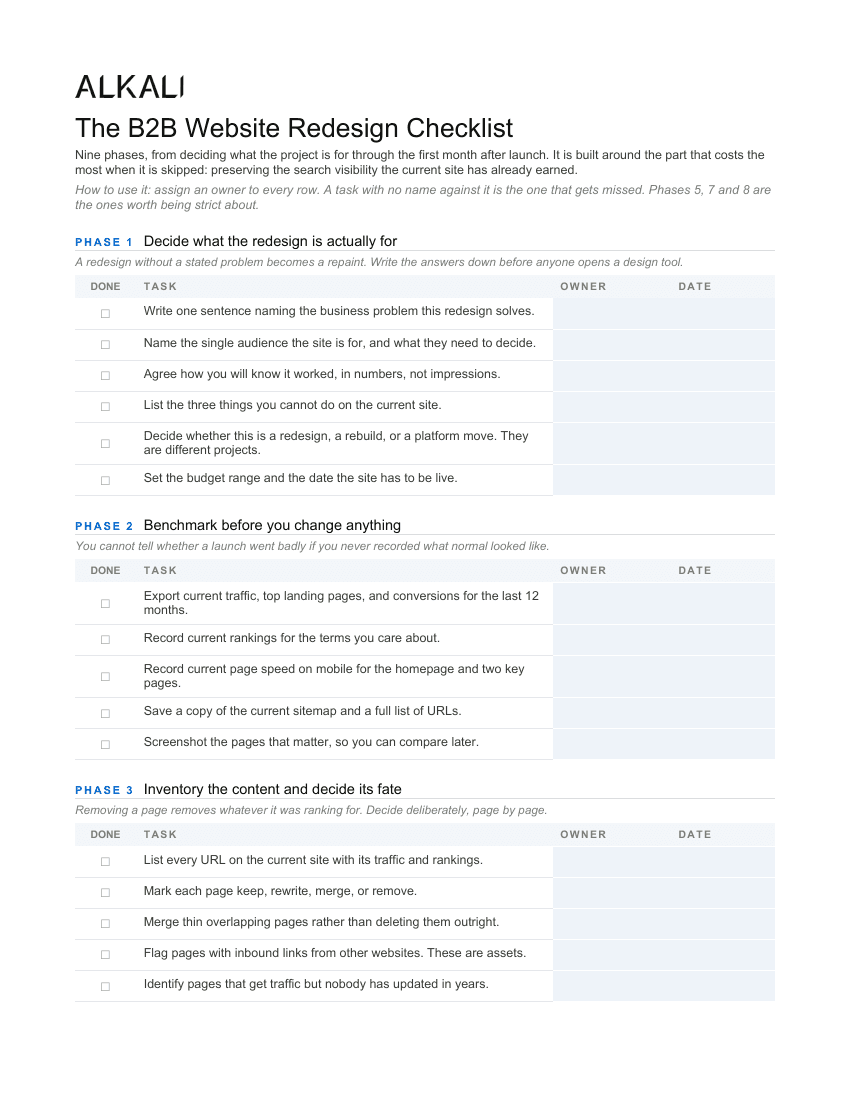
Three pages. Page one covers goals, benchmarking and content decisions; pages two and three cover URL mapping, staging, pre-launch, launch day and the first 30 days.
The Word file opens in Word, Google Docs or Pages. Word is the version most teams want, since a checklist gets owners and dates added to it rather than just being read.
The part that costs the most when it is skipped
If the current site ranks for anything at all, the redesign can destroy it silently. Rankings belong to URLs, so every address that changes without a 301 redirect forfeits whatever that page had earned, along with every link pointing at it from somebody else's website. The buyer usually finds out two months after launch, when the phone is quieter than it used to be.
The failure is rarely a missing map. It is a partial one. Teams map the top twenty pages, launch, and discover later that a few hundred deeper URLs were dropped, each quietly bringing in a handful of visits from a technical buyer searching for something specific. Together they were often a meaningful share of the qualified traffic. The fix is unglamorous: a content inventory first, then a row in a spreadsheet for every URL, including the ones nothing links to.
If the project also moves platforms or restructures the URLs, that is a website migration on top of a redesign, and it deserves its own list. The website migration checklist covers the technical half in more depth. And if you are still deciding how far the project should go, redesign vs. rebuild works through which version you are actually buying.
One last item that belongs on every launch list, above the rest: after go-live, confirm the production site is crawlable and that no canonical tags still point at staging. It takes two minutes. It is also the single most common way a launch turns into a quiet outage, because everything looks perfect to every human who visits.
Common questions
What should be on a website redesign checklist?
Nine phases: state the problem the redesign solves, benchmark the current site, inventory content and decide what to keep, fix structure and messaging, map URLs and plan redirects, build on protected staging, run pre-launch checks, work through launch day in order, and monitor the first 30 days. The redirect map and the launch-day indexing check are the two items that cost the most when skipped.
How do I redesign a website without losing SEO?
Three things carry most of the risk. Keep the content that ranks, since a page you delete is a result you delete. Map every old URL to its closest new equivalent with a permanent 301 redirect. And confirm on launch day that the live site is actually crawlable, because deploying the staging crawler block to production is the most common way a launch quietly fails.
How long does a website redesign take?
Most published estimates say three to six months. Our own B2B builds run 6 to 8 weeks, and the difference is almost entirely content readiness rather than build speed. The phase that slips is nearly always the one where somebody has to write the new copy, which is why the checklist asks you to name that owner in phase three.
What is the difference between a redesign and a rebuild?
A redesign changes the surface: look, layout, and often the words. A rebuild changes the foundation, meaning the platform or CMS underneath. They get combined for efficiency, but they are separate decisions with different budgets and different risks. Conflating them is how projects balloon mid-flight.
Do I need a content inventory before a redesign?
Yes, and it should come first. It is the only reliable way to avoid deleting pages that were earning traffic, and it produces the list of URLs your redirect map has to cover. Skipping it usually means the redirect map covers the pages somebody remembered rather than the pages that exist.
Is this checklist free?
Yes. The Word and PDF versions download directly with no email required. Fill it in, assign an owner to every row, and use it with whichever agency or internal team is doing the work.