The technical SEO checklist, with a pass condition for every row

Technical SEO is the layer that determines whether search engines can crawl, render, and understand a site: indexing controls, architecture, speed, structured data, redirects, and mobile behaviour. It rarely wins rankings by itself. Its job is to stop the site losing rankings the content deserved, which is why the checklist states a pass condition for every row rather than a judgement call.
Download the Checklist↓Word + PDF, no email required
What this covers, and what it deliberately doesn’t
This is the machine layer only: whether a crawler can reach, render, and understand the site. It doesn't ask whether your pages match what buyers search for or whether the homepage says what you do, which are the questions that decide most B2B sites, and which the broader SEO audit checklist covers. Run that one first if you haven't; run this one when the plumbing itself is in question, or before and after anything that touches templates or URLs.
One reason this layer earns more attention than it used to: machines are now a larger share of your important visitors. Buyers increasingly compare vendors through AI tools that read websites, and across our audit of 55,000+ US B2B sites, only 9% use structured data at all. The same crawlability that serves Google serves the assistant that recommends you, so Section 4 is no longer optional polish.
The six sections
| Section | What it checks |
|---|---|
| 1. Crawling and indexing | Excluded pages explained, robots.txt correct, a clean sitemap with only live canonical URLs, self-referencing canonicals, and staging kept out of the index. |
| 2. Architecture and internal linking | Important pages within three clicks, stable lowercase URLs served in one canonical form, no orphan pages, descriptive anchor text. |
| 3. Speed and Core Web Vitals | LCP, INP and CLS from field data, image sizing and formats, render-blocking scripts, and text before three seconds on a phone connection. |
| 4. Structured data | Rich Results Test passing, Organization markup correct, FAQ markup matching visible text, and schema types that match what pages actually are. |
| 5. Redirects and status codes | One-hop 301s from every domain variant, no redirect chains, retired pages pointed at their closest equivalent, and a 404 that returns a real 404. |
| 6. Mobile | No horizontal overflow, thumb-usable forms, a tappable phone number, and content parity with desktop. |
The checklist
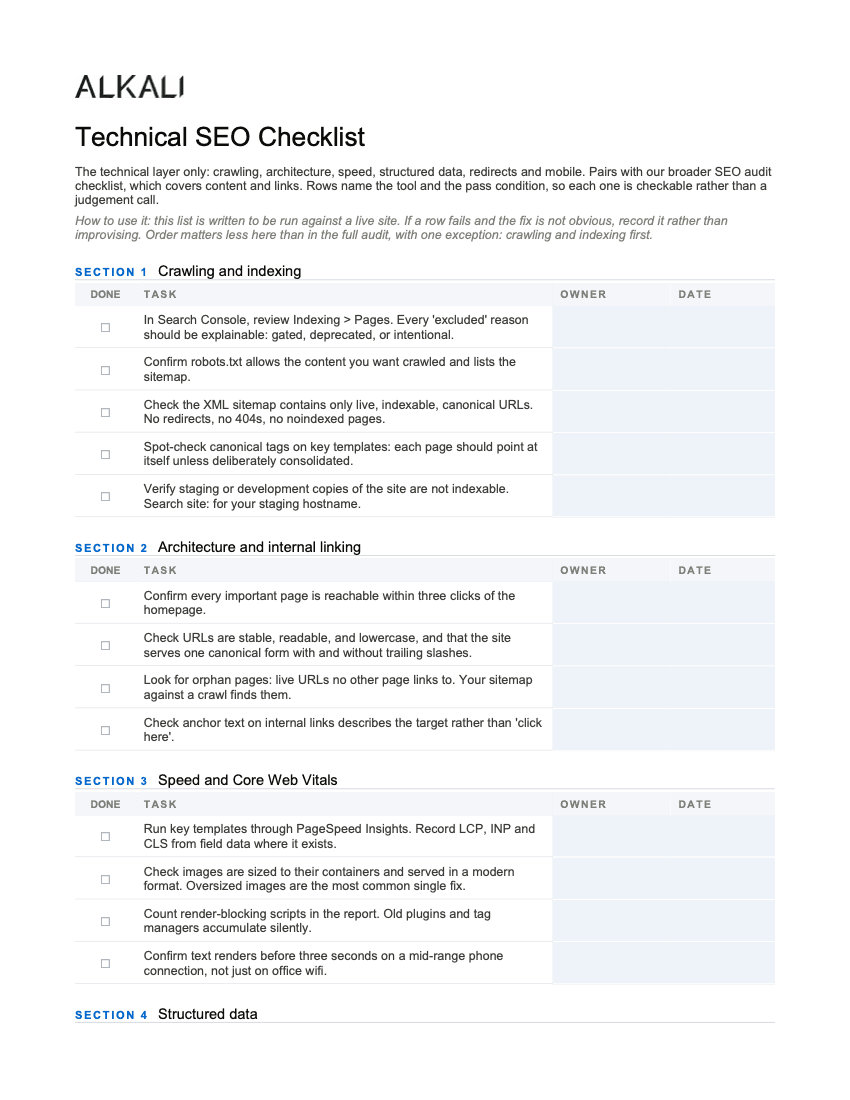
The full checklist, exactly as it appears in the download. Each row is written as a testable condition; the Word and PDF versions add owner and date columns.
| Crawling and indexing |
|---|
| In Search Console, review Indexing > Pages. Every 'excluded' reason should be explainable: gated, deprecated, or intentional. |
| Confirm robots.txt allows the content you want crawled and lists the sitemap. |
| Check the XML sitemap contains only live, indexable, canonical URLs. No redirects, no 404s, no noindexed pages. |
| Spot-check canonical tags on key templates: each page should point at itself unless deliberately consolidated. |
| Verify staging or development copies of the site are not indexable. Search site: for your staging hostname. |
| Architecture and internal linking |
|---|
| Confirm every important page is reachable within three clicks of the homepage. |
| Check URLs are stable, readable, and lowercase, and that the site serves one canonical form with and without trailing slashes. |
| Look for orphan pages: live URLs no other page links to. Your sitemap against a crawl finds them. |
| Check anchor text on internal links describes the target rather than 'click here'. |
| Speed and Core Web Vitals |
|---|
| Run key templates through PageSpeed Insights. Record LCP, INP and CLS from field data where it exists. |
| Check images are sized to their containers and served in a modern format. Oversized images are the most common single fix. |
| Count render-blocking scripts in the report. Old plugins and tag managers accumulate silently. |
| Confirm text renders before three seconds on a mid-range phone connection, not just on office wifi. |
| Structured data |
|---|
| Run key pages through Google's Rich Results Test. Errors fail; warnings are worth reading. |
| Confirm Organization markup exists with the correct name, address and logo. |
| Where a page answers questions, check FAQ markup matches the visible text exactly. Markup for content not on the page is a violation. |
| Check product or service pages carry the schema type that matches what they actually are. |
| Redirects and status codes |
|---|
| Confirm http, www and bare-domain variants all 301 to one canonical origin in a single hop. |
| Crawl for redirect chains: A to B to C wastes crawl budget and dilutes signals. One hop is the standard. |
| Check retired pages 301 to their closest live equivalent, not to the homepage. |
| Confirm the 404 page returns a real 404 status code, not a 200 with error text. |
| Mobile |
|---|
| Load key templates on a real phone. Check nothing overflows horizontally and forms are usable with a thumb. |
| Confirm the phone number is tappable and the primary call to action is visible without scrolling. |
| Check content parity: the mobile page should carry the same content as desktop, not a trimmed version. |
A note on how strict to be: a row that fails on a template nobody visits is a different finding from the same row failing on your quote page. Weight the failures by the pages they sit on, and fix the templates your buyers actually reach first.
The rows that matter most
Three earn special attention on established B2B sites. First, staging kept out of the index: a development copy that Google can see splits your rankings against yourself. Second, redirect hygiene, because years of quiet moves accumulate into chains and inconsistent domain variants, and it's the layer that migrations and redesigns break most expensively. Third, structured data: the machine-readable layer that tells both Google and the AI tools buyers now use exactly what your pages are.
For speed, use field data over lab scores where it exists, and calibrate against the real distribution: the median of 56,005 US B2B homepages we measured scores 59 out of 100 on Google PageSpeed, and 70.5% take longer than three seconds to show anything. Beating the median is a real advantage; chasing 100 is a hobby.
Common questions
What is technical SEO?
The layer that determines whether search engines can crawl, render, and understand a site: indexing controls, site architecture, speed, structured data, redirects, and mobile behaviour. It rarely wins rankings on its own; its job is to stop a site losing the rankings its content deserved.
What does a technical SEO checklist include?
Six areas: crawling and indexing, architecture and internal linking, speed and Core Web Vitals, structured data, redirects and status codes, and mobile. The useful version states a pass condition for every row, so each check is verifiable rather than a matter of opinion.
How is technical SEO different from a full SEO audit?
A full audit also asks whether the content matches what buyers search for and whether the site earns links, which are judgement-heavy questions. Technical SEO is the machine layer underneath, and almost every row has a testable answer. Run the full audit to find out what is wrong; run the technical checklist to verify the plumbing.
Do Core Web Vitals affect rankings?
They are a ranking signal, and a modest one; relevance still dominates. The stronger case for passing them is the buyer: visitors who leave during a slow load look identical in analytics to visitors who were never interested, and that loss operates on every visit regardless of what Google weighs this year.
What is the most common technical SEO problem?
On established B2B sites, redirect debt: domain variants resolving inconsistently, chains from years of moves, and retired pages sent to the homepage instead of their equivalents. Second place is a stale sitemap listing redirects and dead URLs. Both are boring, checkable, and quietly expensive.
How often should technical SEO be checked?
The full checklist quarterly or after any deployment that touches templates, and always before and after a migration or redesign, which is where the expensive breakage happens. Search Console's indexing report is worth a monthly glance between passes.